Mod Settings
Tie your mod's variables to settings, and you can craft a more dynamic experience around each player's preferences.
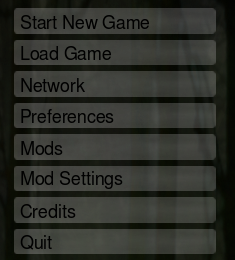
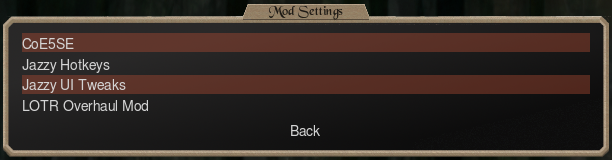
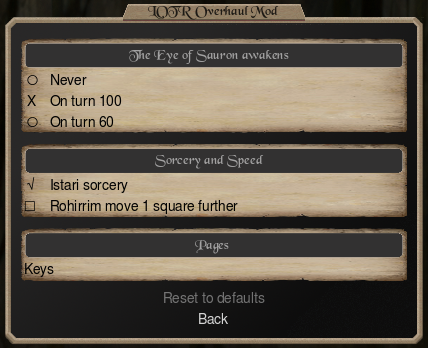
A setting takes two steps. Declare it, so it shows on that page. Then read it in your events or script, where it changes the game.
Declaring settings
Declare settings in the .c5se, or on #!@ lines of the .c5m. Each setting is newsetting, one kind (onoff, choice or key), a default and a label, in any order. Text lengths and the number of options: Limits.
newsetting <name>
Creates a setting.
- name: The word your events and scripts read the setting by: letters, digits and
_, starting with a letter. Each name once per mod; capitals don't count.
newsetting eye_awakens
#!@newsetting eye_awakens
onoff
Adds a single on/off checkmark. An event with +setting <name> happens only while it's checked, and a script reads true or false.
onoff
#!@onoff
choice
Adds a list of 2 to 8 options, where the player picks one. An event with +setting <name> <option> happens only while the player has that option picked, and a script reads the option's number.
choice
#!@choice
key
Adds a hotkey, where the player picks which keyboard key does something in your mod. Your Lua script reads the key with coe5.setting and gives it its job, such as a shortcut for one of the game's actions (coe5.rebindKey).
key
#!@key
default <value>
Sets the setting's starting value.
- value: 0 or 1 for
onoff; an option's number forchoice; a key in double quotes forkey.
Key names
- A letter, digit or punctuation key is its character:
"y","7","?". Capitals count:"B"is shift+b. - Named keys: Space, Tab, Enter, Esc, Backspace, Delete, Home, End, PgUp, PgDn, Up, Down, Left, Right, F1 to F12.
- Combinations:
ctrl+,alt+orctrl+shift+and a key:"ctrl+i","alt+s","ctrl+F5".
On:
default 1
Or a key:
default "p"
On:
#!@default 1
Or a key:
#!@default "p"
label "<text>"
Sets the setting's text on the page, or a sub-page's name after newsettingpage.
label "The Eye of Sauron awakens"
#!@label "The Eye of Sauron awakens"
option <number> "<text>"
Adds an option to a choice.
- number: The option's number, from 0, with no gaps.
- text: The option's text.
option 1 "On turn 100"
#!@option 1 "On turn 100"
optiontip <number> "<text>"
Sets an option's hover text.
- number: The number of the
optionit describes.
optiontip 2 "A short game: Mordor marches early."
#!@optiontip 2 "A short game: Mordor marches early."
tip "<text>"
Sets the hover text of an onoff or key setting.
tip "Every turn of spring, every player gains 5 fire."
#!@tip "Every turn of spring, every player gains 5 fire."
restart
Asks the player to restart the game when they leave your page with the setting changed.
restart
#!@restart
group "<word>"
Stops the key settings of one group in your mod from holding the same key.
group "ring"
#!@group "ring"
fixed
Stops the player changing a key setting.
fixed
#!@fixed
newsettingheader "<title>"
Puts the onoff and key settings after it in a box with this title, up to the next newsettingheader or choice. Follow it with an onoff or key setting.
newsettingheader "Sorcery and Speed"
#!@newsettingheader "Sorcery and Speed"
newsettingpage <name>
Puts the settings after it on a sub-page, up to the next newsettingpage. Give it a label.
- name: The page's name: 1 to 32 letters, digits and
_, starting with a letter. Players see itslabelinstead.
newsettingpage keys
label "Keys"
#!@newsettingpage keys
#!@label "Keys"
Example settings
newsetting eye_awakens
choice
default 1
label "The Eye of Sauron awakens"
option 0 "Never"
optiontip 0 "Sauron sleeps: no endgame."
option 1 "On turn 100"
option 2 "On turn 60"
optiontip 2 "A short game: Mordor marches early."

newsettingheader "Sorcery and Speed"

newsetting istari_sorcery
onoff
default 1
label "Istari sorcery"
tip "Every turn of spring, every player gains 5 fire."

newsetting swift_cavalry
onoff
default 0
label "Rohirrim move 1 square further"
restart

newsettingpage keys
label "Keys"

newsetting ring_next
key
default "n"
label "Next Ring-bearer"
group "ring"

newsetting ring_previous
key
default "b"
label "Previous Ring-bearer"
group "ring"

newsetting close_map
key
default "x"
label "Close the map of Middle-earth"
fixed
#!@newsetting eye_awakens
#!@choice
#!@default 1
#!@label "The Eye of Sauron awakens"
#!@option 0 "Never"
#!@optiontip 0 "Sauron sleeps: no endgame."
#!@option 1 "On turn 100"
#!@option 2 "On turn 60"
#!@optiontip 2 "A short game: Mordor marches early."

#!@newsettingheader "Sorcery and Speed"

#!@newsetting istari_sorcery
#!@onoff
#!@default 1
#!@label "Istari sorcery"
#!@tip "Every turn of spring, every player gains 5 fire."

#!@newsetting swift_cavalry
#!@onoff
#!@default 0
#!@label "Rohirrim move 1 square further"
#!@restart

#!@newsettingpage keys
#!@label "Keys"

#!@newsetting ring_next
#!@key
#!@default "n"
#!@label "Next Ring-bearer"
#!@group "ring"

#!@newsetting ring_previous
#!@key
#!@default "b"
#!@label "Previous Ring-bearer"
#!@group "ring"

#!@newsetting close_map
#!@key
#!@default "x"
#!@label "Close the map of Middle-earth"
#!@fixed
Reading settings
Events read a setting with +setting, with no script needed. A Lua script reads one with coe5.setting("<name>").
Warning
In network games, no event with +setting or -setting happens.
+setting <name> [index]
Makes an event happen only while the setting is on, or while a key setting has a key. -setting is the opposite. Goes in an event, in the .c5se or the .c5m.
- name: The name on the setting's
newsettingline. - index: For a
choice, the option the player picked; for akey, the key it holds.
While it is on:
+setting istari_sorcery
Or while a choice has option 1:
+setting eye_awakens 1
While it is on:
#!@+setting istari_sorcery
Or while a choice has option 1:
#!@+setting eye_awakens 1
Example events
The events that read the example settings above:
playerevent
+turnnbr 100
+setting eye_awakens 1
message -2 "The Eye of Sauron opens. Mordor marches on the free peoples."
endevent

playerevent
+turnnbr 60
+setting eye_awakens 2
message -2 "The Eye of Sauron opens. Mordor marches on the free peoples."
endevent

playerevent
+season 3
+setting istari_sorcery
addresources -2 7 5
endevent
playerevent
+turnnbr 100
#!@+setting eye_awakens 1
message -2 "The Eye of Sauron opens. Mordor marches on the free peoples."
endevent

playerevent
+turnnbr 60
#!@+setting eye_awakens 2
message -2 "The Eye of Sauron opens. Mordor marches on the free peoples."
endevent

playerevent
+season 3
#!@+setting istari_sorcery
addresources -2 7 5
endevent